LED Keyboard: RGB Lighting
- 4.5
- Rating
- 50.00M
- Installs
- Free
- Price
 Analysis by App-foxy
I spent time using LED Keyboard: Colorful RGB as an everyday Android keyboard rather than treating it as a quick theme demo. My conclusion is fairly clear: this is a personalization app for people who want their keyboard to feel expressive, colorful, and noticeably different from the standard option. It is less convincing if your priority is the quietest design, the most restrained battery use, or a keyboard chosen mainly for advanced writing assistance.
The appeal is immediate. Instead of accepting the keyboard that comes with your phone, you can give the typing area an RGB-inspired appearance, change its visual style, and add personality through themes, fonts, and emojis. That makes ordinary actions such as replying to a message, searching the web, or writing a shopping list feel more personal. I found the visual change more meaningful than I expected, especially on a phone that otherwise looked completely ordinary.
It is a free personalization app from Zayzik : LED Keyboard Studio, rated for Everyone. The app has built a large audience, with more than 50 million installs and an average rating of 4.5 from roughly 579 thousand ratings. Those figures do not automatically make it the right keyboard for you, but they do show that the colorful approach has broad appeal.
You May Also Like

 AccuWeather: Weather Radar
AccuWeather Review: A Quick, Clear Forecast for Everyday Decisions
For everyday plans, the best forecast is the one you can understand quickly. AccuWeather makes rain timing, radar, and local conditions easy to act on, with a few trade-offs.

 Hill Climb Racing
Why Hill Climb Racing Still Turns Crashes Into One More Run
A tiny car, a bumpy hill and one more upgrade: Hill Climb Racing keeps resurfacing because its simple chaos makes every near-miss feel personal.

 AliExpress - Shopping App
AliExpress Makes Global Shopping Feel Personal, but Shoppers Bear the Risk
AliExpress turns a global marketplace into a pocket-sized discovery engine. Its reach is useful, its shopping loop compelling, and its trade-offs easy to miss.

 Lords Mobile: Kingdom Wars
Lords Mobile Is a Kingdom-Building Routine, Not a Quick Match
A case-by-case verdict on the building, battles, device demands, and social commitments that make Lords Mobile rewarding for some players and exhausting for others.

 PDF Scanner app - TapScanner
TapScanner Makes Paperwork Easier to Capture, Check, and Share
TapScanner makes scanning with a phone feel less like a rescue operation and more like a dependable step in getting work done. Its capture tools are useful, though not flawless.

 Block Blast!
 Shows How Much a Puzzle Game Can Leave Out
A quiet grid game shows why puzzle players increasingly value instant clarity, repeatable skill and low-pressure play—and where the genre still needs to catch up.
More From Our News Desk
View All News


What the colorful keyboard experience is really like
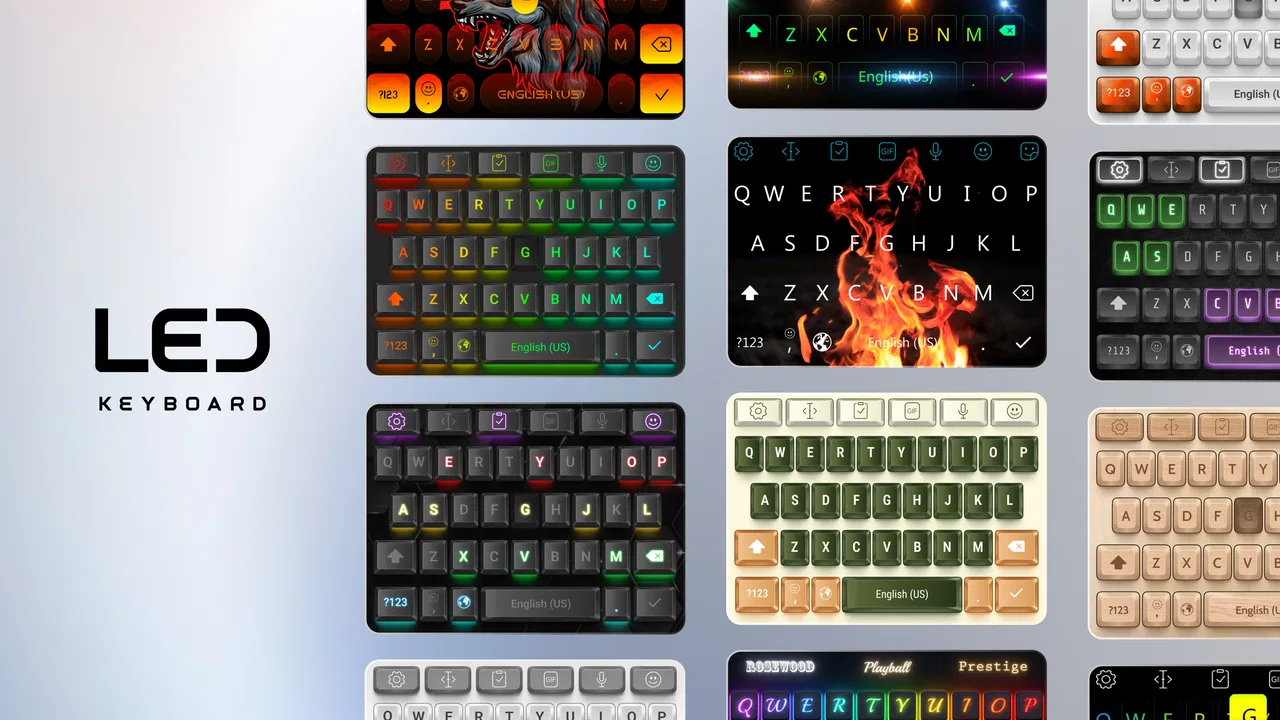
The first thing to understand is that this is not simply a wallpaper placed behind your existing keyboard. The purpose is to replace the ordinary typing surface with a more decorative keyboard experience. The central idea is customization: RGB effects, themed appearances, different fonts, and emoji-focused expression are all brought together in one place.
I liked that the app gives the keyboard a stronger identity without requiring me to redesign the entire phone. A home-screen theme can be attractive, but I may only see it briefly during the day. A keyboard appears whenever I write, so even a small visual change gets repeated many times. That makes this type of app particularly suitable for anyone who enjoys matching their phone to a favorite color, mood, or personal style.
The LED-inspired look is most successful in messages and social conversations. Bright colors and animated-looking visual effects can make the keyboard feel lively, while a softer theme can keep the result from becoming distracting. The important point is to choose a style that remains readable. A dramatic background may look impressive in a preview but become tiring if the letter shapes blend into it during fast typing.
My practical advice is to test a theme while writing a normal paragraph, not just while admiring the keyboard on its setup screen. Type a sentence with capital letters, punctuation, numbers, and a few corrections. That quickly reveals whether the colors help you enjoy the keyboard or make the keys harder to distinguish. For me, the best results came from treating the RGB effects as decoration around the keys rather than allowing them to overpower the letters.
Customization is the main reason to install it
The strongest part of the app is the range of ways to make the keyboard feel like yours. Themes change the overall mood, fonts alter the visual character of the keys, and emojis add another layer of expression when plain text feels too flat. This combination is more useful than having a single flashy background because it lets you adjust the keyboard for different occasions.
For example, I would use a bright, energetic look for casual conversations and a calmer design for work messages. That small distinction matters when the keyboard is visible throughout the day. It also gives the app a practical role for families or friends who share the same phone model but want their devices to look different.
There is a useful trade-off here. More customization creates more opportunities to find a style that suits you, but it also makes the setup process less immediate than simply using the default keyboard. If you enjoy adjusting visual details, browsing themes feels like part of the fun. If you want to install a keyboard and forget about it, the extra choices may feel unnecessary.
I also found that the font option should be judged as a typing aid as much as a decorative feature. A playful typeface can make the keyboard more distinctive, but unusual letter shapes may slow down recognition when I am typing quickly. I would start with a readable font, then experiment with more decorative choices after becoming comfortable with the layout.
Where it fits into everyday use
Imagine replying to messages during a commute, writing a short note to a friend, and then entering a search in the evening. The keyboard is present in all three situations, so the customization follows you rather than staying confined to one app. That is the most convincing everyday use case: LED Keyboard: Colorful RGB turns a routine interface into a small piece of self-expression.
It can also suit people who enjoy coordinating their digital style. Someone who already changes wallpapers, icons, or lock-screen designs may appreciate having the keyboard match that effort. The keyboard can become part of a broader color scheme instead of looking like an unrelated default component.
On the other hand, I would hesitate to recommend it to someone who writes long documents on a phone and cares more about a minimal interface than visual variety. A colorful keyboard does not automatically improve writing speed, spelling, or organization. Its value is primarily visual and expressive. That distinction is important because a person looking for serious writing help may be happier with a keyboard selected for editing tools and an uncluttered layout.
The small details that affect comfort
A keyboard has to work repeatedly, not just look good in a screenshot. I paid attention to whether the decoration competed with the keys, whether the chosen font remained easy to recognize, and whether the overall presentation felt comfortable after extended use. My experience was best with moderate effects and clear contrast. The more intense the visual treatment became, the more carefully I had to check my typing.
This leads to a simple setup workflow I recommend. First choose a theme with strong letter contrast. Next test it in a message that includes punctuation and numbers. Then try the same design at night or in a dim room, where bright effects can feel more prominent. Finally, keep the style for a full day before deciding whether it is genuinely comfortable. A keyboard that looks exciting for five minutes may be less pleasant after dozens of conversations.
Emoji use is another area where the app can feel more personal than a plain keyboard. Emojis are not merely decoration for many people; they help communicate tone in short messages. Having that expressive side close at hand makes sense for casual chats, especially when a colorful keyboard already encourages a more playful approach to communication.
Still, I would not confuse a larger sense of style with better communication. The right emoji depends on context, and a visually dramatic keyboard will not make a formal message more appropriate. I see the emoji emphasis as a convenience and a personality feature, not as a replacement for thoughtful writing.
What may frustrate careful users
The most meaningful weakness is that visual customization can come with friction. The free app is easy to try, but in-app purchases range from $2.49 to $27.99 per item. That does not make the free starting point unhelpful, yet it means users should pay attention before assuming every appealing option is included without cost. I would explore the available free choices first and decide whether the extra customization is worth spending money on.
There is also a broader keyboard consideration: changing from the keyboard already installed on the phone is a more significant decision than changing a wallpaper. A keyboard handles text entry, so comfort, trust, and habit matter. Anyone who depends on a familiar keyboard’s established workflow may find the switch more disruptive than expected, even if the new appearance is attractive.
For that reason, I would not install this simply because an RGB preview looks impressive. I would install it because I genuinely want a more decorative typing experience. If the visual effect is the main goal, the adjustment is easier to justify. If I am hoping for a major improvement in typing accuracy or productivity, I would look at alternatives designed around those needs instead.
Another limitation is visual fatigue. Bright colors are exciting at first, but they can become tiring when used constantly. My solution would be to keep a calmer theme available and change styles when the vivid design starts to feel too busy. That approach makes the app more flexible than committing permanently to the most intense RGB appearance.
Who should use it, and who should skip it
I think this app is a strong fit for Android users who see the keyboard as part of their phone’s personality. It is especially appealing if you enjoy colorful interfaces, themed designs, expressive fonts, and frequent emoji use. It also makes sense for someone whose current keyboard feels visually dull and who wants a noticeable change without replacing the whole phone’s design.
It is less suitable for users who want a nearly invisible keyboard that stays out of the way. People writing extensively on a small screen may prefer a design optimized for clarity and concentration. I would also suggest caution for anyone who dislikes changing established habits, because even a familiar-looking themed keyboard can feel different once used for real conversations.
Compared with the usual default keyboard, this app’s advantage is obvious: it offers far more visual personality. The default option is generally the easier choice for people who want familiarity and minimal setup. Compared with a productivity-focused keyboard, LED Keyboard: Colorful RGB is more about mood and appearance than writing assistance. In other words, it wins on self-expression, not necessarily on professional text management.
The current version is 16.6.16 and it works on Android 6.0 or later, which makes it accessible to people using older supported Android devices as well as newer phones. The app was released on January 9, 2019, and its continued presence suggests that the concept has remained relevant to users who enjoy customizing everyday interfaces. I would still judge it by personal comfort rather than by age or popularity alone.
My final recommendation
After using it as a real keyboard, I see LED Keyboard: Colorful RGB as a focused personalization choice rather than an all-purpose answer for every Android user. Its best quality is that it makes something I use constantly feel more individual. Themes, RGB-style effects, fonts, and emojis work together to create a keyboard that can match a mood or a broader phone aesthetic.
The free entry point makes it reasonable to try, while the optional purchases mean I would explore carefully before paying for additional items. I would also spend time checking readability and comfort instead of choosing a theme only because it looks impressive in a preview. Those two habits—testing real sentences and keeping a calmer design available—make the experience much better.
For me, the verdict is positive with a clear qualification: choose this app for expressive keyboard customization, not as a substitute for a productivity-first typing tool. If you want your messages and searches to carry more visual personality, it is an enjoyable option from Zayzik : LED Keyboard Studio. If you prefer a quiet, predictable keyboard that disappears while you write, the standard alternative will probably suit you better.
At no cost to start and with an Everyone rating, it is approachable for a wide audience. Its large community—more than 13 thousand written reviews alongside the much larger rating total—also reflects sustained interest in the idea. I would recommend giving it a fair trial, using it through ordinary messages rather than judging it from the setup screen alone. If the colors make you smile without getting in the way of clear typing, this is exactly the kind of small personalization upgrade that can make a phone feel more like your own.
FAQs for LED Keyboard: RGB Lighting
01What customization options are available in LED Keyboard: Colorful RGB?
LED Keyboard: Colorful RGB offers a wide range of customization options that allow users to personalize their typing experience. You can choose from various color themes, adjust brightness levels, and select different keyboard layouts. Additionally, users can apply effects like ripple, wave, and other dynamic animations to enhance the visual appeal.
02Is LED Keyboard: Colorful RGB compatible with all Android and iOS devices?
The app is designed to be compatible with most Android and iOS devices. However, it’s important to ensure that your device meets the minimum operating system requirements specified in the app store. Always check for the latest updates to ensure full compatibility and access to new features.
03Does using LED Keyboard: Colorful RGB affect battery life?
While LED Keyboard: Colorful RGB is optimized for efficiency, using dynamic lighting effects and high brightness settings can impact battery life. To minimize battery usage, you can adjust brightness settings, limit the use of animations, or switch to static color themes when necessary.
04Are there any privacy concerns with LED Keyboard: Colorful RGB?
LED Keyboard: Colorful RGB prioritizes user privacy and does not collect personal data without consent. The app requires certain permissions to function correctly, such as accessing the keyboard settings, but it does not store or transmit any sensitive information. Always review the app’s privacy policy for detailed information.
05Can I use LED Keyboard: Colorful RGB for multiple languages?
Yes, LED Keyboard: Colorful RGB supports multiple languages, allowing users to switch between languages easily. You can enable language packs from the settings menu and customize the keyboard layout to suit your language preferences, making it a versatile choice for multilingual users.
Pros
- Highly customizable themes and colors.
- User-friendly interface with simple navigation.
- Smooth performance with minimal lag.
- Compatible with various apps seamlessly.
- Regular updates with new features.
Cons
- Limited free themes available.
- Ads can be intrusive at times.
- Some features require in-app purchases.
- Might drain battery faster on older devices.
- Occasional bugs with certain Android versions.

LED Keyboard: RGB Lighting
Gallery